Owning a private jet remains one of the most coveted symbols of wealth and luxury. Yet, nowadays, you don’t need to be a famous athlete, politician, or business magnate to have one.
The demand for private jet travel is soaring to unprecedented levels. According to aviation analytics firm WingX, the number of annual private flights has surged by 34% since 2019, with nearly four million flights taking place globally last year. A noticeable spike occurred in March when private jet usage skyrocketed by 300%, as celebrities and influencers scrambled to leave the Middle East amid the outbreak of conflict in Iran.
One notable instance involved financial influencer and self-proclaimed ‘property expert’ Samuel Leeds, who spent £150,000 on a private jet to return to the UK. The 34-year-old advised others fleeing drone-hit Dubai, saying, “I don’t know why everyone is not doing this.”
This raises the question: just how much does it cost to own a private jet?
To uncover the answer, I embarked on an unusual shopping experience.
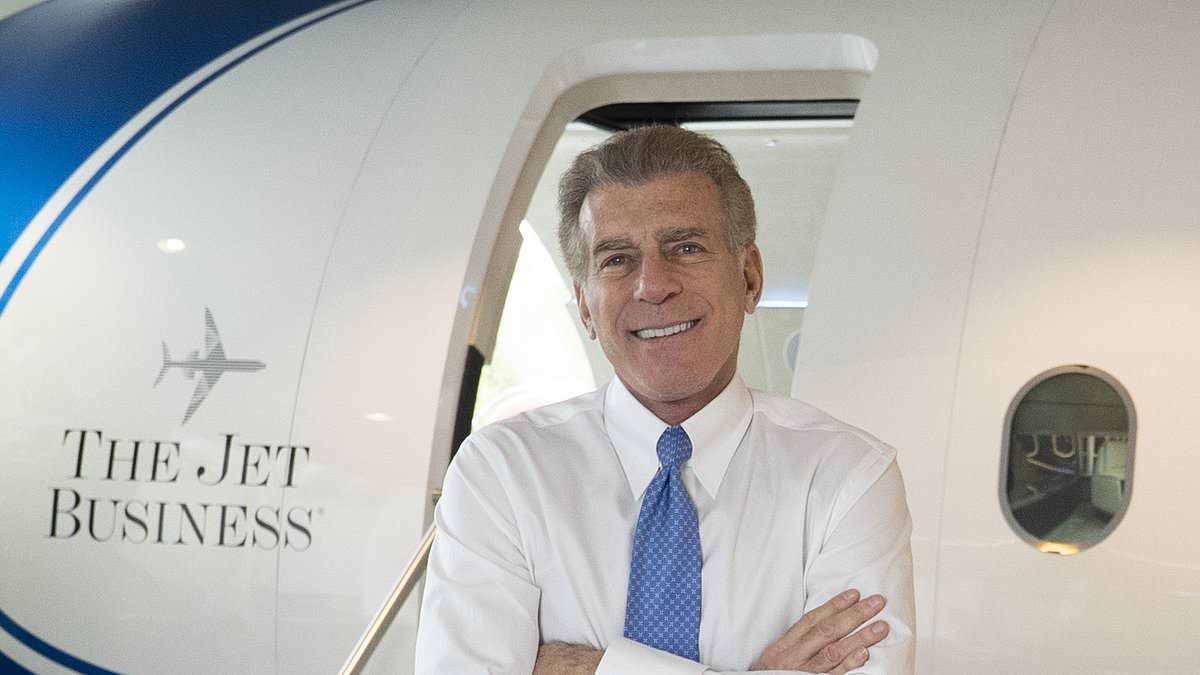
In the heart of London’s affluent Mayfair district, on Park Lane, lies The Jet Business, a hub for acquiring these luxury aircraft.
High flyer: Steve Varsano, founder of The Jet Business, in Mayfair, central London
Inside, it’s like stepping into an aircraft – a £1million life-sized private jet replica has been built into the office.
White leather sofas and reclining seats line either side of the aircraft, with a bar and a bottle of champagne at the ready.
Steve Varsano, founder of the Jet Business, who has nearly three million followers on social media, attempts to do what he does best – sell me a jet.
He first offers me ‘any drink I can imagine’. ‘We offer anything you’d like, and if we don’t have it we’ll get it as quickly as possible,’ says Varsano.
He walks me to the front of the plane and out the door on the left into a room lined with TV screens from floor to ceiling. It shows a map of the world with live headwinds and a picture of all the available private jets on the market.
Since he started in 1979, he says he has met hundreds of billionaires.
One of the smallest and cheapest models for sale costs about £370,000, according to Varsano. For this price, the jet won’t look much like what you see on social media, but a cramped four-person plane, such as a 1980s Learjet 35A.
If your budget stretches to £750,000 you can splash out on a 20-year-old, four-person jet that can fly for two hours without stopping – a Phenom 100 or Cessna Mustang.
For high-end jets, prices range from £10 million to £125 million. But it is the ongoing maintenance costs that are eye-watering. A mid-range jet can cost £3 million a year to run. This can hike to £5 million for the more expensive models. This covers pilot salaries, insurance and fuel.
Varsano says: ‘The running costs are why I tell around 30 per cent of people who come in here to just not get one.
‘The biggest mistake people make is that they buy the jet for ego, and then in six or 12 months they realise how stupid it is and sell it.’
Varsano has received some bizarre requests. One buyer demanded marble tables and chandeliers – ignoring pleas that this would affect the weight limits of the jet.
In the end, the plane’s maximum range was halved – a reduction of thousands of miles.
But interest in private jets is growing, even among those who can’t afford one, Varsano says.
He claims to have over a billion views on his videos, which give an inside look into the world of private jets and offer advice on ‘jet etiquette’.
For example, if you are ever lucky enough to be invited on to a private jet, never sit on either the front-right seat of the plane or the most comfortable looking seat – those are for the owner.
Although the main draws of a private jet are, of course, the privacy it buys and the ability to fly without being beholden to a commercial airline’s timetable, Varsano tells me of a lesser-known perk.
He says: ‘The biggest cause of jetlag is the altitude pressure in the cabin. It’s not really going through the time zones but the high pressure inside a cabin on a commercial flight.
‘With a private jet, the altitude is much lower, which means you arrive much more cognitive. Your body is hydrated, there is more oxygen and it doesn’t disrupt your body nearly as much.’
As for the celebrities and influencers you see posing on private planes, it’s unlikely they own the aircraft, Vasarno says.
‘We’ve had a few Hollywood celebs come through here but most of them are used to being spoiled by the studios or by clients – so don’t usually buy.’
There are, of course, a few exceptions. Pop star Taylor Swift uses her plane to jet off on her global tours and reality star Kim Kardashian is often seen flying in her $150 million Gulfstream jet.
DIY INVESTING PLATFORMS
AJ Bell
AJ Bell
Easy investing and ready-made portfolios
Hargreaves Lansdown
Hargreaves Lansdown
Free fund dealing and investment ideas
interactive investor
interactive investor
Flat-fee investing from £4.99 per month
Freetrade
Freetrade
Investing Isa now free on basic plan
Trading 212

Trading 212
Free share dealing and no account fee
Affiliate links: If you take out a product This is Money may earn a commission. These deals are chosen by our editorial team, as we think they are worth highlighting. This does not affect our editorial independence.
Compare the best investing account for you