
HOMEOWNERS are being urged to take an extra step to protect their property, and it starts with Google Maps.
Experts warn that criminals are using the app’s Street View tool to scope out homes before breaking in.


The warning comes from California, where police have said burglars are getting more sophisticated.
Riverside Police Department Officer Ryan Railsback said some crooks are already scanning homes online to look for easy targets.
“The crooks are looking for new and innovative ways to victimize people,” he told ABC News.
“It’s good for the public to be aware of that and counter what the criminals are already doing.”
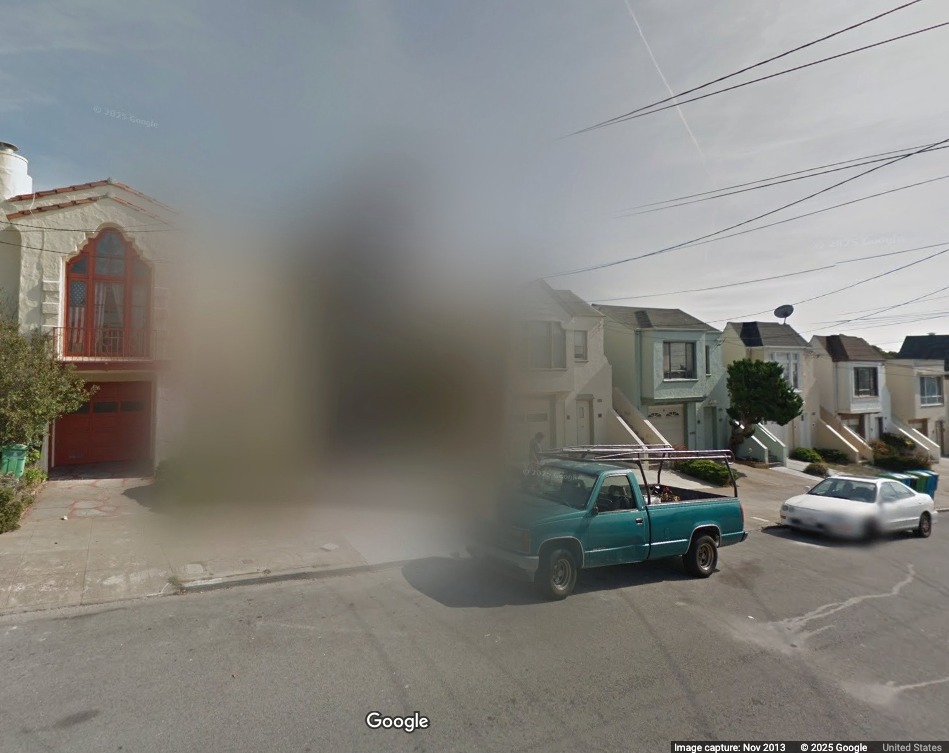
One way to block burglars is to blur your home on Google Maps.
Street View images offer a clear shot of your property, including possible entry points, layout, and even your security setup.
That’s exactly the kind of information criminals are looking for, an expert said.
Professor Christopher Hermann, of the John Jay College of Criminal Justice in New York, said thieves often check online before striking.
“Would-be thieves certainly want to scout their locations before they hit them,” Hermann said.
He said they scan images to spot security cameras, fences, or high-value items visible in driveways or yards.
While the idea of blurring your home may seem extreme, it’s a tactic already being used by some burglars.
Homes on some of the US’s most expensive streets, such as in East Hampton in New York, are already blurred out.
To blur your home, you must open Google Maps and switch to Street View mode.
Once you have found your house, click “Report a problem” in the bottom-right corner of the image.
HOW TO ACCESS SATELLITE SOS ON GOOGLE PIXEL

Here’s what you need to know.
First, note that the feature is only available in the US (except Hawaii and Alaska) right now.
And it’s also only available for the Pixel 9, Pixel 9 Pro, Pixel 9 Pro XL, and Pixel 9 Pro Fold.
If you’re eligible, simply follow these official steps from Google:
To contact emergency services when you don’t have a network coverage on your Pixel phone:
- Dial 911 immediately.
- If you don’t have a mobile or Wi-Fi network, you’ll find an option to use Satellite SOS in the dialer.
- Tap Satellite SOS > Use Satellite SOS > Start.
- To describe your emergency, fill out the emergency questionnaire.
- To share your emergency with your emergency contacts, answer the on-screen questions.
- To notify your emergency contacts, tap Notify.
- If you don’t want your emergency contacts to receive your location and emergency information, tap Don’t notify.
- To connect to the satellite, follow the on-screen prompts to correctly position your phone.
- Connection and response times vary based on location, site conditions, and other factors.
- Once you’re connected, the emergency service provider should reply via text within a few minutes.
- To receive replies, stay outside with a clear view of the sky.
- When you would like to end the satellite text conversation, press the End button and follow the prompts.
You will be asked to complete a short form and pinpoint exactly what needs to be blurred.
Google mentioned, “Should you have provided your email address in the form, we might reach out to you for further details or to inform you about your report’s progress.”
The only catch is that the blur is permanent and cannot be undone once applied.
Only a homeowner or tenant can request the blur, and the company will review each request individually.
“Google Street View cars capture images from public roads, which might include your home,” the company said.
“If an image contains inappropriate content, or you prefer your home not be shown, you can request it to be blurred.”
Some law enforcement officials say it’s a simple, effective precaution.
But experts also warn it could have the opposite effect.
If you are the only home on your block that’s blurred, it could make criminals curious about what you are hiding.
Still, many say it’s worth considering, especially if you live in an area known for property crimes.
With Street Views accessible to anyone with an internet connection, the risk may not be worth taking.