
Share this @internewscast.com
Throughout my years of testing and reviewing countless e-readers, the 5-inch Kobo Mini has stood out as a personal favorite for one primary reason: its compact size. While it lacked features like screen lighting and page-turn buttons, its portability made it a daily companion. Enter the $69 Xteink X4, an even more diminutive e-reader that outshines the Kobo Mini and E Ink phones like the Boox Palma in terms of portability. Although its size is appealing, its initial functionality and user-friendliness leave much to be desired. Fortunately, an active user community is dedicated to enhancing its capabilities.
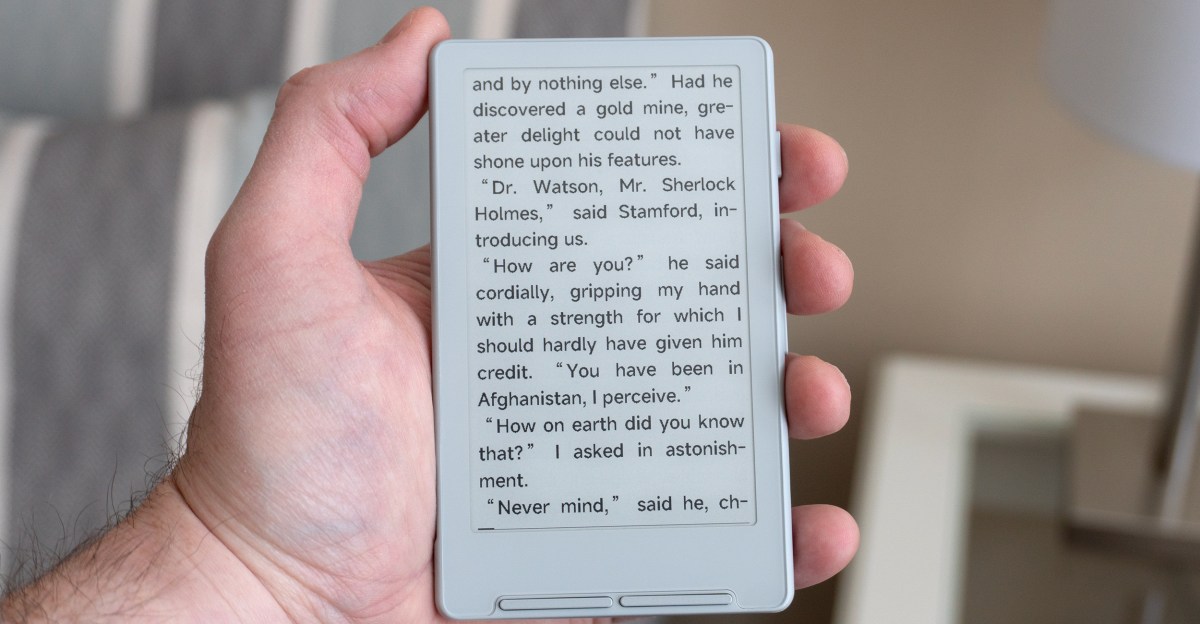
Much like the Kodak Charmera, the X4’s compactness comes as a delightful surprise. With a 4.3-inch E Ink display, slightly smaller than the Kobo Mini’s 5-inch screen, the X4’s slender bezels contribute to its notably reduced size. However, my excitement over the X4’s dimensions was tempered when I encountered one of its most intriguing features.

When Xteink introduced the X4 last December, they showcased images of the device attached to an iPhone via MagSafe, presenting it as a superior option to traditional e-reader cases for those seeking a secondary phone screen. Unfortunately, the magnets’ awkward placement prevents the e-reader from aligning correctly with my iPhone 16 Pro, rendering it impractical.


This alignment issue has been a common grievance among X4 users. In a statement to The Verge, Xteink acknowledged that their development and testing involved a limited range of iPhone models, resulting in misalignment on some newer devices. To address this, they provide magnetic adhesive rings that users can attach to their phones for better alignment.
Given that the X4 extends beyond my iPhone’s base, I’ve opted to use it as a standalone ultra-compact e-reader rather than attempting the awkward pairing. The device, less than 6mm thick, fits neatly into my daily sling bag and comes with a basic magnetic folio case for protection.


With a price point among the lowest for e-readers, the Xteink X4 does come with trade-offs, such as its 4.3-inch E Ink display with a 220ppi resolution, which is lower than the 300ppi found on current Kindles and Kobo devices. Although fine text may appear slightly jagged under close inspection, the resolution is adequate for an enjoyable reading experience.
There’s also no screen lighting, so if you’re planning to read before bed, you’ll need a lamp or a flashlight. The lack of a touchscreen is more frustrating. The X4 features several buttons on its right edge and below its display. They’re not labeled, and their functionality varies depending on where you are in the UI.


Further complicating matters, three of the buttons are two-sided and do different things depending on which side you press. It’s frustrating to try and remember which side of which button you need to press to make a selection, jump back to a previous screen, or simply navigate a list of options. And it’s not helped by the X4’s limited and confusing software.
While Boox’s smartphone-size E Ink Palma devices run Android and let you do everything from watching videos to playing games, the X4 is solely focused on reading, with support limited to TXT and EPUB files, plus images like JPGs and BMPs, which I had limited success loading. There’s no built-in bookstore so you’ll need to source your own DRM-free EPUB files. That’s a little easier now, thanks to Amazon recently expanding support for EPUBs, but just getting ebooks onto the X4 feels harder than it could be.


The e-reader doesn’t mount as a storage device when connected to a computer, and while you’re supposed to be able to wirelessly upload files from a browser over Wi-Fi or your phone, I didn’t have much success in getting that to work. The easiest way is to copy files to a memory card using a USB reader, but that is needlessly complicated by the X4’s microSD card slot that makes inserting and ejecting a memory card difficult without long nails or a paper clip.

Reading ebooks is an okay experience, and I’m always a fan of dedicated page turn buttons. But if you’re familiar with a Kobo or Kindle, you’ll find yourself sorely missing options for adjusting text formatting. You only get two font-size choices, three line spacing options, and no way to increase the margins around text. Images and illustrations in ebooks are simply not displayed, most text formatting is ignored, and while you’re supposed to be able to load and use your own font files, it’s another finicky feature I had no success with.
You can jump to different chapters, pages, and bookmarks, or turn on features like auto page turns at set intervals, but doing so requires opening and navigating a series of menus using the X4’s buttons. It feels unnecessarily complicated. It’s an experience you’ll eventually get marginally comfortable with, but not one you’ll ever enjoy.


Xteink has already released several software updates improving the X4’s UI and usability. Progress has been slow, but because the company hasn’t locked down the e-reader, a growing community has taken it upon itself to improve the X4. Installing CrossPoint Reader on the X4, an open-source alternative firmware, was a simple process that immediately solved many of the pain points of Xteink’s software. CrossPoint simplifies the X4’s UI, expands the options for how ebooks look, and adds onscreen labels for what each button does. It’s also easy to uninstall, but I don’t think I’m ever going to.
The X4 will never replace the Kobo Libra 2 I use for most of my reading. A touchscreen, lighting, access to a robust ebook store, and a UI that doesn’t have me pulling my hair out are features I can’t do without. But over the past few weeks, I haven’t left the house without the tiny X4. It’s a welcome alternative to my phone (that always seems full of bad news) if I have a few minutes to while away, despite its frustrations. I don’t like recommending devices that require third-party upgrades to be “fixed,” but the work being done by the X4 community makes the e-reader worth considering if pocketability — and a little tinkering — is your priority.
Photos by Andrew Liszewski / The Verge