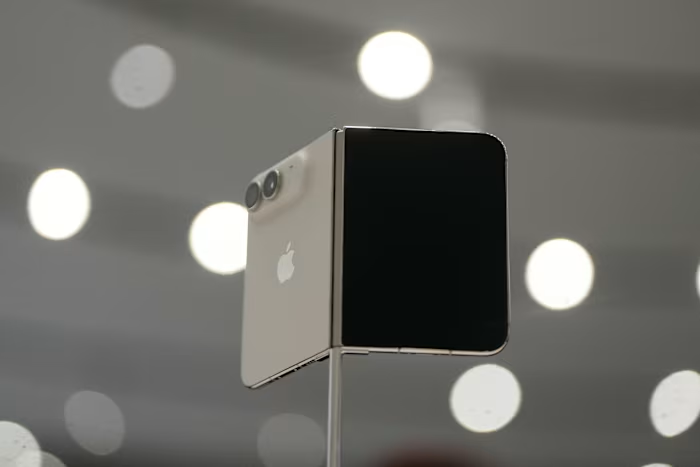


Apple’s newest iPhone lineup arrived this week with upgraded features, sharper cameras and premium pricing to match — including a foldable version that starts at $1,999. For anyone preparing to spend big on an iPhone 18, protecting that investment from day one will be key to making it last.
The same logic applies if you are trying to avoid an expensive upgrade altogether. Whether you use an iPhone or an Android device, a few smart habits can help stretch your current phone’s lifespan and save money.
With smartphone advances becoming more gradual, many consumers no longer feel pressured to buy the latest model every year. At the same time, concerns over electronic waste have added another reason to keep devices in use longer instead of sending them to landfills. Today’s smartphones are also built tougher than earlier generations, with better resistance to water, spills and accidental drops.
The average smartphone replacement cycle has stretched to about four years, according to Counterpoint Research. Some users say in online forums that they have managed to keep their phones running for more than seven years.
Here are some practical ways to help extend the life of your smartphone:
Protect your phone’s battery
Battery health is one of the biggest factors determining how long a phone remains useful. Apple notes that a rechargeable battery’s lifespan depends on its “chemical age,” which is shaped not just by when it was made but also by conditions such as temperature exposure and charging habits. As lithium-ion batteries age chemically, they store less power, which can lead to “reduced peak performance,” the company says.
Samsung also advises users not to let a lithium-ion battery drain completely, warning that doing so may shorten its overall life.
“The battery is absolutely often the first thing to go in most people’s phones,” said Elizabeth Chamberlain, director of sustainability at the device-repair website iFixit.
Lithium-ion batteries typically last about 300 to 500 charging cycles before degrading noticeably to the point that they can’t last a day without needing a charge, she said. “Many people will hit 500 cycles in two years. Heavy users will get there faster.”
Batteries get stressed if they are completely drained or fully charged, Chamberlain said.
So avoid letting your battery die, and also avoid charging it all the way to 100%, “unless you really need a full charge,” she said. “Aim to keep the battery between 20% and 80% charged.”
If you are in the habit of plugging in your phone when you go to bed, Apple and Samsung both have charging optimization technology that improves battery life by delaying a full charge based on your daily routine.
This feature, which is on by default in iOS, pauses charging at 80% and then charges to 100% just before you wake up.
Phone batteries shouldn’t get too hot or cold
Device makers warn against exposing phones to extreme heat or cold, both of which can damage batteries.
Apple says batteries warm up as they charge, which can shorten their life span. It warns against using your phone or charging it in very hot temperatures, above 95 degrees Fahrenheit (35 Celsius).
Samsung says you shouldn’t leave your phone in, for example, a car’s glove box when it is very hot or cold. And don’t put it in a freezer either — it’s a myth that it can prolong battery life.
Google, which makes the Android operating system and Pixel phones, says hot batteries drain faster, even when they are not in use, and that can damage the battery.
Adjust your phone’s power options to boost battery life
Tweak your device settings so apps or features use less power, which extends your battery’s daily life and the time between charging cycles.
You can turn down your phone’s screen brightness, turn on the dark theme and reduce the time for the screen to power off. Enable the auto-brightness feature, which adjusts screen brightness according to the level of ambient light. Also check battery usage in your settings to see if there are any power-hungry apps you can switch off or uninstall.
If the power level dips below 10%, iPhone users can turn on low power mode to stretch their battery’s life before it needs recharging. Samsung’s Android phones have a similar “power saving mode.” You can also leave it on all the time, but it might affect your phone’s performance.
Phone cases and screens are essential protection
Phones are sleek capsules with glossy surfaces that also make them easier for them to slip out of your hand. A sturdy protective case is essential to help cushion the blow from accidental drops.
However, beware that some phone cases can retain heat, so your phone might stay hot even if it seems cool, Chamberlain warns.
Don’t forget a screen protector. Plastic versions are cheap but can scuff easily, according to iFixit, which recommends TPU film or tempered glass because they offer better protection against scratches and drops.
Keep your device clean
Keeping your phone in your pocket or purse means ports and sockets collect debris that needs to be cleaned out.
Chamberlain said that when a phone stops charging, often the problem is simply that the charging port is jammed with lint, preventing the cable from connecting.
You can buy kits with brushes, picks, swabs and dust blowers to give your phone’s ports, speaker and microphone grilles a thorough cleaning. But in a pinch, use a toothpick and a clean toothbrush.
Update the software regularly
Software is another important factor in a phone’s life span. Experts advise keeping your operating system and apps up to date so they have the latest privacy, security and battery management features.
That will be easier to do as your phone ages because some device makers have been extending the time limit for providing updates.
Google has pledged to provide Pixel 8 and newer phones with seven years of Android and security updates, compared with four to five years for older models. Samsung pledged in 2024 to extend its operating system updates to seven years.
Apple hasn’t spelled out how long it will support iOS updates for phones. The iPhone 11, released in 2019, was the oldest model still getting updates this year. But reports suggest it might not be eligible for the new iOS 27 due this month.
Some phones are designed to be easily repaired
Sometimes your phone will have a problem that can only be solved by repairing it, usually involving paying someone else to fix it.
But there are device makers that are making it easier to repair phones yourself. Netherlands-based Fairphone makes phones it says are designed for longevity, which come with a stripped-down version of Android and can be easily disassembled using a mini screwdriver. Replacement batteries, screens and other spare parts can be ordered online.
Fairphone’s Chief Technical Officer Chandler Hatton said the company aims to have its devices last at least five years.
“What we’re trying to do is to support people to be able to use their device for longer,” Hatton said.
___
Is there a tech topic that you think needs explaining? Write to us at onetechtip@ap.org with your suggestions for future editions of One Tech Tip.