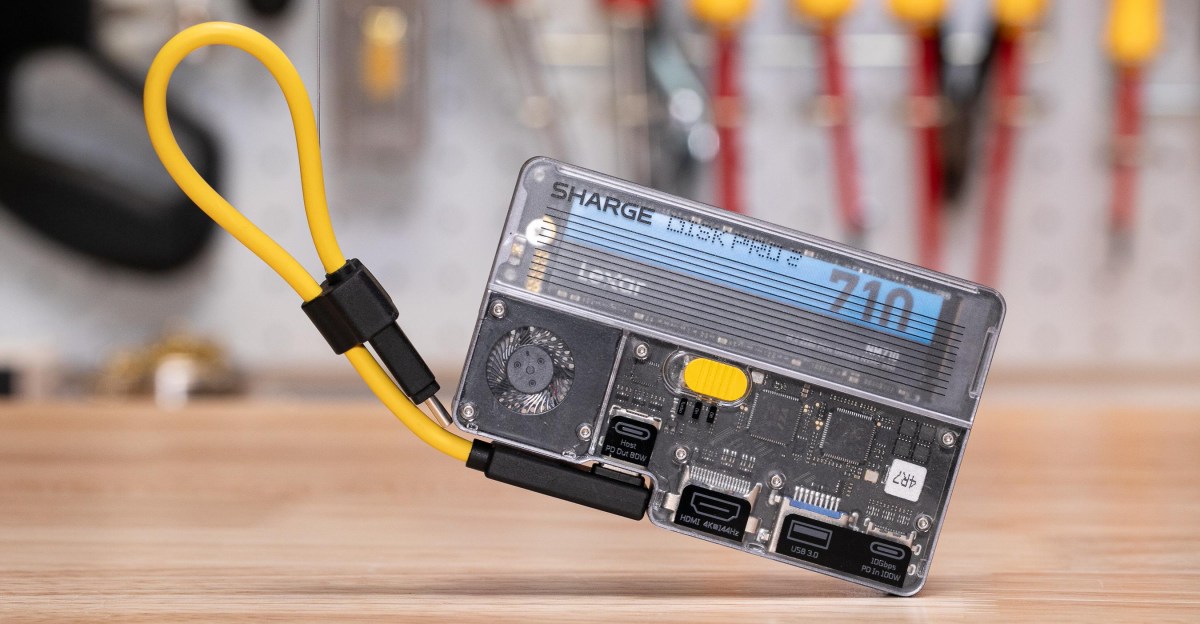

Sharge has built a reputation on charming tech accessories, from retro Mac-inspired chargers to transparent batteries that show off their inner workings. Its portable SSD lineup, though, has never quite won me over — not the Sharge Disk, not the Disk Plus, and not even the Disk Pro. The new Disk Pro 2 Ultra is the first one I’d genuinely want to keep in my own bag.
That’s because Sharge’s latest portable SSD is much more than external storage. It doubles as a 4K HDMI dock and a compact USB-C hub, turning it into a pocketable USB-C multitool for a laptop, tablet, smartphone, Steam Deck, Nintendo Switch, and even the Switch 2.
Sharge also built in a MagSafe-style magnetic array, so the device can snap onto an iPhone, a Pixel, or just about any gadget you’re comfortable outfitting with a magnetic ring. The company includes one adhesive ring in the box.
Despite being roughly the size of a deck of cards, the Disk Pro 2 Ultra adds a generous set of ports: a 4K 144Hz HDMI 2.1 output, a 5Gbps USB-A connection, SD and microSD card readers, and USB-C passthrough charging. It also includes an internal slot for up to 8TB of SSD storage using a standard M.2 2280 drive, with support for smaller M.2 2242 and 2230 SSDs as well.
With just one cable connected, I was able to add a second external display to my MacBook Pro, access four storage sources at once — the internal SSD, a USB flash drive, an SD card, and a microSD card — and still feed the laptop 80W of USB-C Power Delivery charging.
When I connected an Android phone and a USB-C iPhone, both recognized the SSD and mirrored to my HDMI display. On the iPhone, it also enabled 4K60 ProRes video recording — a feature worth coming back to shortly.
To be clear, Sharge isn’t the only company combining these kinds of features, and this 10Gbps external SSD enclosure is no speed champion in an era of 40Gbps and 80Gbps alternatives. In my tests, using an affordable 1TB Lexar NM710 inside the Disk Pro 2, large 100GB and 195GB transfers produced average write speeds of about 700MB/s.

But that’s still nothing to sneeze at, and how many enclosures double as USB-C HDMI docks, let alone ones that speak Nintendo’s language and magnetically attach to your phone? How many have a built-in fan to keep them cool? And how many are low-power enough that you can power the HDMI and USB ports from your phone or laptop, no need for a power cord?
Things get a little tricky with the low wattage, though.
First, Sharge is selling two models of the Disk Pro 2, the “Ultra” that requires at least 1.5W of USB-C bus power, and and the “Lite” which needs 5W for its more power-hungry chips (and only does 4K60 over HDMI 2.0, instead of 4K144 over HDMI 2.1).
Second, to achieve such low power draw on the Ultra, it can only route 3W of power from your laptop or phone to a connected SSD, Sharge marketing manager Leo H. tells me. Reviews show my borrowed Lexar NM710 draws more than that during writes — and sure enough, the Disk Pro 2 shut down right after I started ProRes video recording on an iPhone 15 Pro or a big transfer on my Galaxy S25.
(There’s a simple solution: just plug an external USB-C battery or charger into the Disk Pro 2. When I did that, I recorded over five minutes of 4K60 ProRes video, no problem. You could instead try to find a lower-power SSD.)

Photo by Sean Hollister / The Verge
Third, while the HDMI dock does work with both my Switch 2 and my original Switch, Nintendo’s handhelds explicitly check for a relatively specific external power source before docking. Sharge is still tweaking the firmware, but says I currently need a 85W or higher USB-C PD charger plugged in for Switch 2 in particular.
You should also know there’s a long pause before the Nintendo Switch and Switch 2 appear on a connected TV, like some other third-party docks, and you won’t get variable refresh rate (VRR) with a Steam Deck or other PC handhelds. It does 4K144 and 4K120 with HDR, but the Steam Deck claims my VRR TV is not VRR-capable with the Disk Pro 2 as a go-between.
And while I successfully worked with a mouse, keyboard, headset, monitor, webcam, and more plugged into the Disk Pro 2 for several days — by daisy-chaining an extra USB hub — I did occasionally see the monitor go dark for a minute, roughly once a day.
There’s still work for Sharge to do. But it’s the first drive from the company that I’d happily add to my go bag.

Photo by Sean Hollister / The Verge
The original Sharge Disk was a bulky dongle with a ridiculously noisy tiny fan. The Disk Plus marketed itself as barely-there stylishly thin SSD enclosure that magnetically attaches to your phone, but the magnets were actually a stick-on accessory that made the drive much thicker. The first Sharge Disk Pro had a power port so tiny and recessed that most charging cables wouldn’t fit, and buttons that could actually cut power to the drive mid-transfer.

Photo by Sean Hollister / The Verge
The Disk Pro 2 fixes all that. The included cable is now detachable, the magnets are built-in, the ports are no longer weirdly recessed, the fan isn’t noisy by default, you can turn off that fan entirely, the switch doesn’t cut power to the drive, and the drive has a larger airflow path. Plus, you can bring your own SSD — though I’d prefer toolless swaps to the current screws.

Photo by Sean Hollister / The Verge
You won’t always see much higher transfer speeds turning that fan on full blast. My 195GB transfer took 4 minutes and 55 seconds with the fan on full power, and 5 minutes 5 seconds with it off — a difference of just 10 seconds, even though I let it cool between test. The real difference is the one I felt when trying to pick up the Disk Pro 2 afterwards. Without fan, the metal sides were burning hot to the touch.
The Disk Pro 2 Ultra is $75 on Kickstarter for early bird and will be $89 full retail. While the typical caveats apply with Kickstarter projects, Sharge has a very solid track record for shipping (even if it’s hit and miss on design).


